How to Handle Suspicious Transactions
Last updated: November 9, 2026
Fraudulent transactions and chargebacks are increasing in the dumpster rental industry. When fraud occurs, it often results in a chargeback within four months, leading to lost revenue that is nearly impossible to recover.
To help protect your business, we have introduced a risk flag system that identifies suspicious transactions based on common fraud patterns.
Understanding the Risk Flag System
Our system analyzes past chargebacks and highlights transactions that share suspicious characteristics. If a transaction is flagged, it does not automatically mean fraud is occurring, but it does indicate that further review is needed.
Common Fraud Indicators
Red Flags | Why It’s Suspicious |
|---|---|
🌎 International IP Address | Order placed from outside the U.S. |
🏠 Different Billing & Service Address | Billing info does not match the service location. |
🏦 Multiple Orders with Different Billing Addresses | Same customer, different billing details for each order. |
🛒 Multiple Orders Across Shopping Carts | Unusual pattern of orders in a short period. |
👥 Customer Name vs. Billing Name Mismatch | Cardholder name differs from the person placing the order. |
📍 Out-of-State Billing Address | Billing location does not match the business’s operating area. |
📞 Non-Local Phone Number | Contact number is not from the expected region. |
⏳ Short Order Timeline | Rush orders, such as next-day delivery. |
If a transaction meets several of these conditions, our system will flag it as:
🔶 Medium Risk – Some concerns, but may still be valid.
🔴 High Risk – Multiple risk factors present; strong chance of fraud.
🔴🔴 Highest Risk - Many risk factors present; almost certain fraud.
These risk levels appear directly on the invoice page so your team can quickly assess the situation.
What to Do If a Transaction Is Flagged
Once a transaction is marked as risky, your team is the best line of defense. The transaction has already gone through, so it’s up to you to investigate and determine if it’s legitimate.
Steps to Verify a Suspicious Transaction
Hover over the risk flag on the invoice to see which red flags were triggered.
Call the customer and ask direct questions:
Did you place this order yourself, or was a broker involved?
Why is the cardholder’s name different from yours? Can you provide ID?
Where are you currently located?
Why are you placing multiple orders under different names?
Are you traveling?
Can you explain the connection to the cardholder?
Use your best judgment—if the responses seem suspicious, take extra precautions.
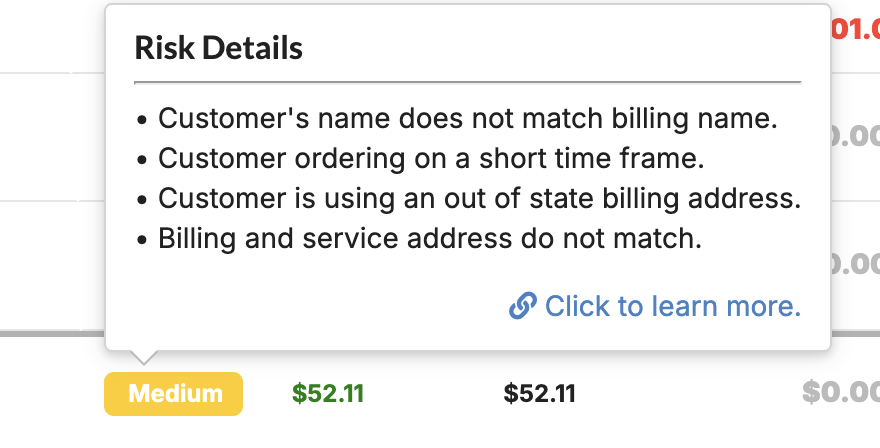
How to Handle High-Risk Transactions
If something feels off, request an alternate payment method (such as cash or bank transfer).
Meet the customer in person to verify their ID and card details.
If you believe the transaction is fraudulent, cancel the order and issue a refund.
How to Mark A Client Non-Fraudulent
Occasionally, a regular customer may set off the potential fraud detection. You can quickly hide those incorrect warnings for individual clients.
Open the non-fraudulent client
Click on "actions" in the top right corner, and select "Turn off Transaction Risk Tracking"
Return to invoices page and all invoices associated with that client should no longer show a risk score
If you would like to turn risk tracking back on, you can navigate to the same place and select "Turn on Transaction Risk Tracking"
Protecting Your Business
This system helps identify potential fraud, but it cannot fully prevent it. You play the most important role in evaluating risk and taking action to avoid chargebacks and losses.
By staying vigilant and following these verification steps, you can reduce fraudulent activity and protect your revenue.
Further information can be found: