DocketShop Setup Step 7: Add DocketShop to Your Website
Last updated: November 9, 2026
Once you're all done setting up DocketShop in your Docket account, you’re ready to add it to your website so online visitors can start booking your products online!
There are 3 ways to integrate DocketShop with your website:
Direct URL
iFrame Element
Embedded Script (Recommended)
TIP: If you have a website built by Docket and you want to add DocketShop to it, please use one of the channels below to contact us so we can add it for you:
If you're still setting up your Docket account during onboarding, please reach out to your Implementation Project Manager or email onboarding@yourdocket.com.
If your Docket account is already live, please click this link and fill out the request form at the bottom of the page.
This article is Step 7 of 7 steps listed in our DocketShop Setup Directory.
Before You Start
Here are a few things to know before you continue:
We have a training course in the Learning Hub specifically designed to walk you through your DocketShop setup!
Click here to go to the Learning Hub and log in.
Click here to learn how to log into the Learning Hub.
Click here for more info on both our 'Setting Up DocketShop' courses.You must have Admin or Office Staff permissions in order to set up DocketShop.
You must have a phone number in your Docket profile.
You must have at least one asset in your Docket account.
You must have at least one pricing template set up or your pricing matrix imported into your Docket account.
You must be set up with an online payment processor.
DocketShop is separate from a website and cannot be used without one. Docket provides website services if you don’t already have one. To learn more, click here!
If you’re on our Grow plan, you automatically get Basic DocketShop. If you’re on our Pro plan, you automatically get Premium DocketShop.
Please Note: It’s very important to add your assets and pricing templates or pricing matrix into Docket BEFORE having us activate your DocketShop subscription.
DocketShop automatically pulls in your asset inventory and pricing ONCE when it’s first activated. Moving forward you’ll need to manually update your assets and pricing information, so make sure you have most of the work done beforehand!
Direct URL Integration
This is a direct link to your DocketShop outside of your business website, allowing clients to book online via a standalone webpage.
TIP: This method works best for smaller businesses that don't yet have a business website where they can embed DocketShop under a 'Book Now!' button. You can also add this link to your social media, paid ads, and/or QR Codes.
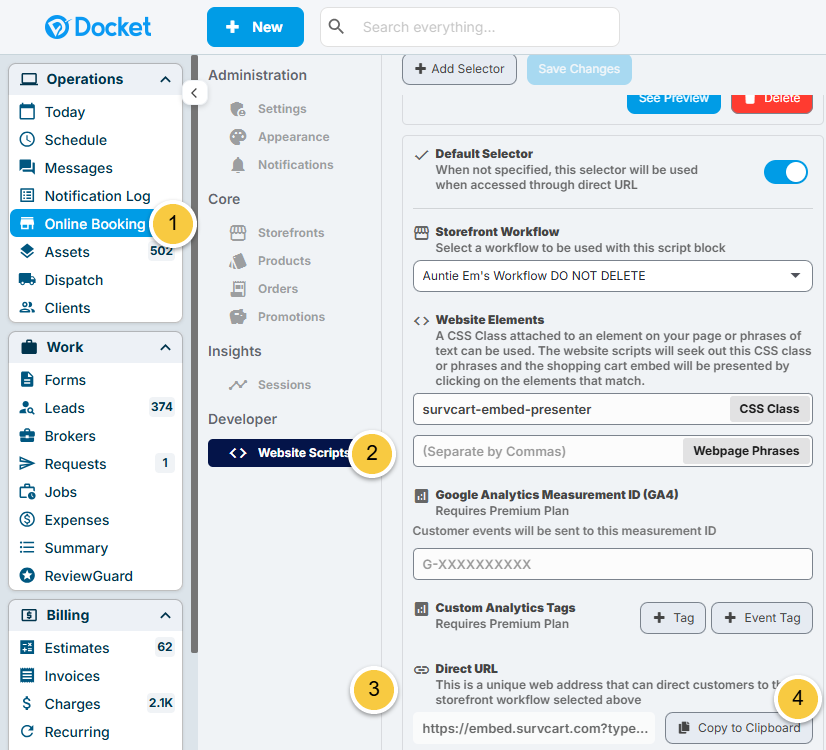
To find your Direct URL, just follow the below instructions:
Click on "Online Booking" to the left.
Click on "Website Scripts".
Scroll down to the Direct URL field.
Click "Copy to Clipboard".
iFrame Element
If you have a business website, this method allows you to embeds DocketShop directly into a specific page of your website.
TIP: This option works well if you want clients to see the full booking experience directly on a dedicated page of your website.
To iFrame DocketShop into an existing webpage, just follow the below instructions:
Click on "Online Booking" to the left.
Click on "Website Scripts".
Scroll down to the Website